

Start here: find your actual error
Before anything else, get the exact wording of your error. Most of these look identical from the outside, but the fix is completely different depending on which one you have.
Go to PhilHealth > Submit Cases > Submission History.
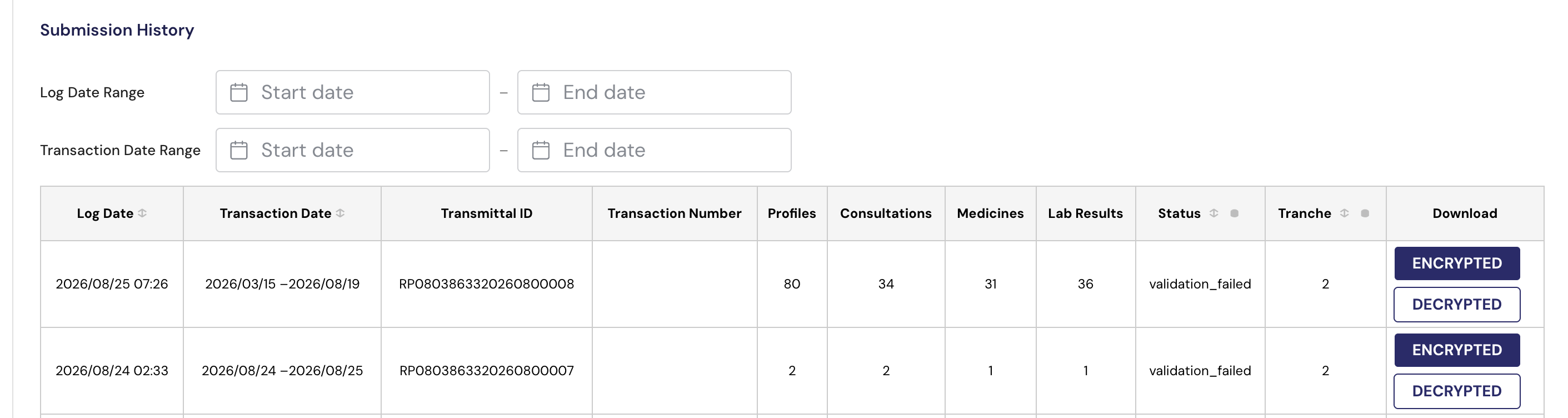
Click the row of the failed submission.
The full error message opens, including any patient PINs involved.
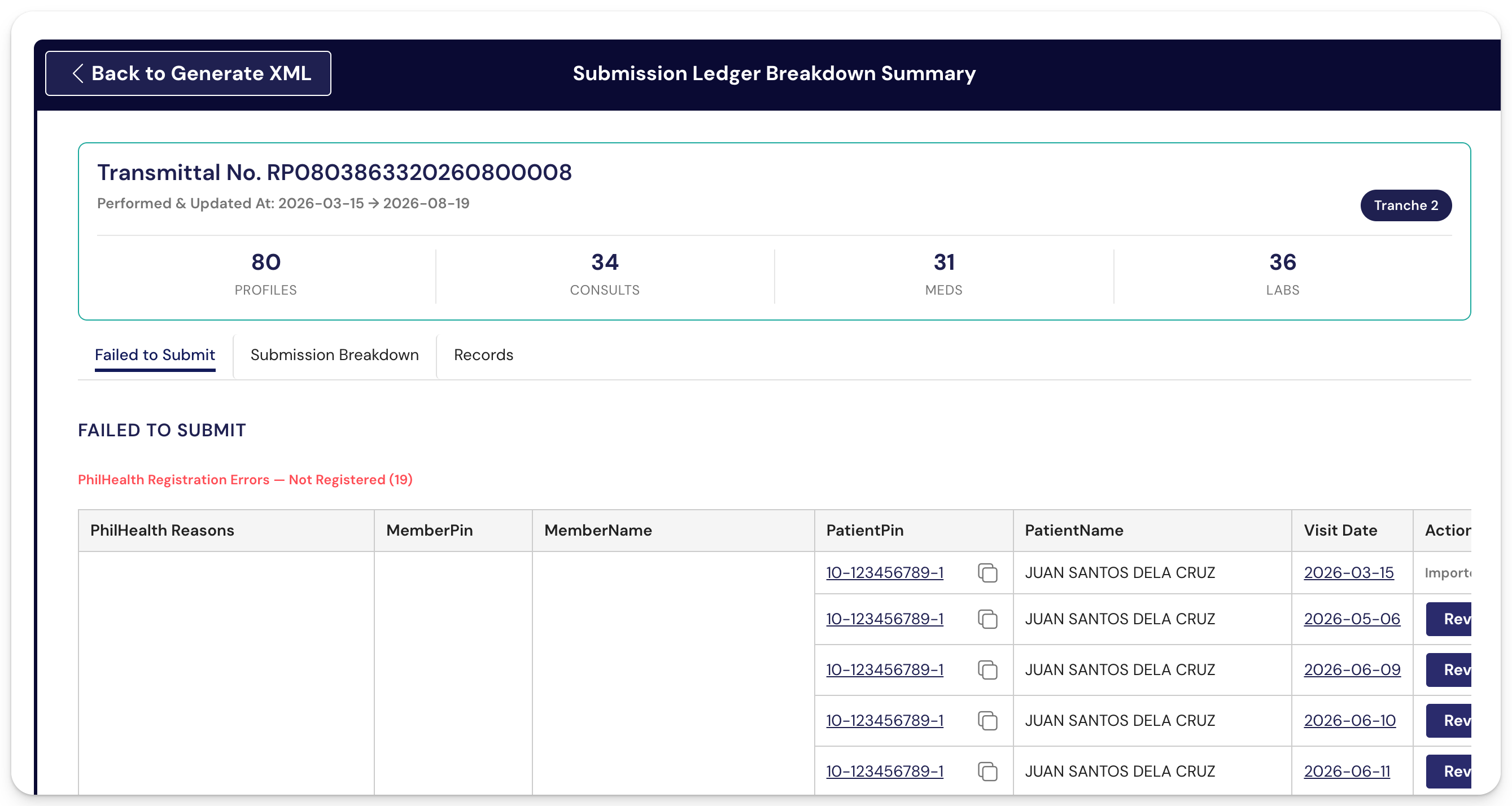
Screenshot that screen. If you end up messaging us regarding the submission error, this is the one thing we need you to send to us.
1. PhilHealth's server is busy or down
You'll see one of these:
- EJB Exception
- Transaction Rolledback: TimedOutException: Transaction timed out after 30 seconds
- An internal server error occurred
- A connection reset or a submission that hangs and then fails
What it means: nothing is wrong with your records. PhilHealth's server was busy or unavailable at the moment you submitted. These four messages look very different but they are all the same situation.
What to do:
- Wait a bit, then submit the same batch again. It usually goes through after a few tries.
- If it keeps failing, try outside peak hours. Early morning and late evening are more reliable than mid-morning.
- Submit daily rather than saving cases up. Smaller batches are far less likely to hit this.
You don't need to change anything in your records, and you don't need to wait for us. Nothing was partially submitted, so resubmitting will not create duplicates.
If it's still failing after a full day of trying, message us. We can check our logs and confirm whether PhilHealth is returning errors across all facilities or only yours.
2. A patient shows as not assigned or registered
You'll see:
Patient <NAME> is not yet assigned/registered
- No Accreditation Record Found alongside the above
What it means: PhilHealth is not currently showing that patient as registered to your facility, so the whole batch is rejected.
Two things trip facilities up here:
- The name in the error might not be your patient. PhilHealth always shows the member's name, never the dependent's. If the name is unfamiliar, the actual patient is a dependent registered under that member.
- One patient blocks everything. All cases in For Submission go in as one batch, so a single affected patient stops the rest.
What to do: revert that patient's visit to Pending under Daily Visits, then submit the rest. Then sort out the registration itself with PhilHealth.
The full walkthrough, including how to find the right record when the name is unfamiliar, is in its own article.
See: "Patient is not assigned/registered" error when submitting cases
3. Effectivity year 2025 or earlier
You'll see:
Upload failed: The record for ENLISTMENT with PIN <pin> could not be accepted due to its effectivity year. The deadline for submission of records with effectivity year 2025 or earlier has passed.
What it means: the record carries an enlistment effectivity year of 2025 or earlier. PhilHealth has closed submissions for those, so the upload is rejected.
There are two very different reasons you might be seeing this, and it's worth knowing which one you have before you spend time retrying.
a. The visits are from 2026, but the record is tagged 2025
This is the common one, and it happens on imported records. Your visits are dated 2026, the patient is on your 2026 masterlist, but the enlistment carried over from your previous system with the effectivity year still set to 2025. The upload gets rejected even though the cases themselves are current.
This needs a correction on our side. Message us with the error message and the PINs it names, and we'll correct the effectivity year on those records so you can resubmit. We've done this for several facilities already.
Before you message us, it's worth trying one thing: submit again with the date filter set to Performed Only. For some facilities that clears it on its own.
b. The cases really are from 2025
If the visits themselves are from 2025 or earlier, the submission window for them has closed and there is no way to reopen it from our side or yours. Retrying will not work, and neither will resubmitting under a different date range.
If your PhilHealth regional office has approved a resubmission of 2025 cases for you, send us that approval and we'll advise from there.
See: How to submit Tranche 1 or Tranche 2 cases
4. A field in one record is in the wrong format
You'll see: a message naming a specific field, sometimes with the value that was rejected. For example:
- pBirthCtrlMethod, PILLS, WITHDRAWAL, CONDOM, DEPO, should not be more than 20 characters
- pMidUpperArmCirc is required
- pDispensingPersonnel is required
- pMemPin, <pin>, Invalid pin/no record found
- pNoCigpk, 0.1, is not valid
What it means: PhilHealth validates every field against its Data Dictionary. One record with one field out of format rejects the entire batch.
Rules we've confirmed from actual rejections:
| Field | Rule |
| Respiratory rate | Whole numbers only. Numbers with a decimal point are rejected. |
| Blood pressure and other vitals | Whole numbers only, no decimals |
| Smoking | Whole numbers only, no decimals |
| Urine protein (NCD Q22) | Numeric mg/dL only. "1+" is rejected |
| Mobile number | Exactly 11 digits |
| Mid Upper Arm Circumference | Required, cannot be left blank |
| Medical history | Something must be selected. "None" is a valid selection, blank is not |
| Findings per System | Cannot be left blank |
| Sputum findings | Must be 1 or 2. "0" is invalid |
| Last Menstrual Date | Must be a valid year. Watch for typos like 20005 |
| Birth control method | 20 characters maximum |
| Medicine instruction strength | 50 characters maximum |
| Advice (Management section) | 500 characters maximum |
| Dispensing personnel | Required on any medicine marked as dispensed |
What to do:
- Note the field named in the error and the PIN, if one is given.
- Under Daily Visits, revert that patient's visit to Pending.
- Correct the field.
- Set the visit back to For Submission and submit again.
We've since added limits in the system on several of these fields, so newer entries are caught before submission rather than after. Older records and imported records can still carry values that were entered before those limits existed.
If the error names a field you can't find or can't edit, message us with the error and the PIN.
5. Nothing was available to submit
No records were available for this submission
What it means: the system found nothing in For Submission status for the range you picked.
What to check:
- Under Daily Visits, confirm the cases show For Submission. That's the only status that gets included. Pending, Confirm Registration and No Submission are all skipped.
- For Tranche 1, confirm the visit is tagged FPE. Only FPE visits go out under Tranche 1. (You'll know a visit is tagged as FPE if there is an FPE tag beside the patient's name)
- Confirm the visit date falls inside the range you selected.
If all three check out and you still get this, message us with the PIN and the visit date. There are a couple of cases where the record is genuinely there but the system isn't picking it up, and we need to look at it directly.
No cases found for the given date range
Same idea, but usually a filter or an import question. If you're generating XML for a period that came from your eKONSULTA import, try switching the filter to Performed Only, and widen your date range.
6. The batch is too large
If a large submission keeps failing with no specific error named, the batch size itself may be the problem.
Break it into smaller batches, weekly or bi-weekly. Better still, submit daily. Small batches go through more reliably, they fail faster when something is wrong, and it's much easier to find the one bad record in a day's worth of cases than in a month's.
Good to know
- One bad record stops the whole batch. Everything in For Submission goes in together. Fixing or reverting that one record clears the submission for everything else.
- The name in a registration error is the member, not always the patient. If you don't recognise the name, look for a dependent registered under that member.
- A failed submission doesn't submit anything partially. Resubmitting after a server error will not create duplicates.
- Send us the error, not a description of it. Submission History, click the failed row, screenshot. It saves a round trip and usually lets us answer in one reply.
