

Use this when you're setting up the PCU Checker App for the first time, or logging back in after a logout.
Step 1: Enter your Host
Under Host, type: yakap-[your accreditation number]
Example: yakap-p1111111
Step 2: Enter your email and password
These are the same login credentials you use for SMD YAKAP on your browser.
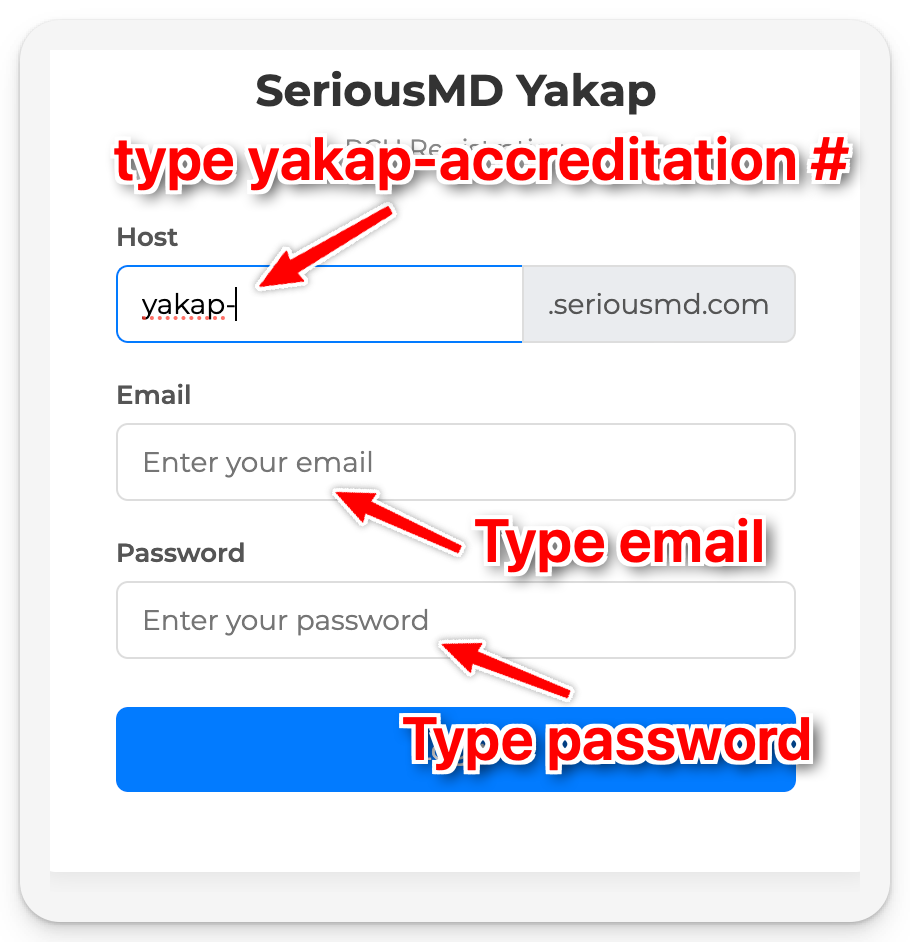
Step 3: Click Log In
Frequently Asked Questions:
1. Can I download the PCU Checker App on my phone/tablet?
- This is only available for laptops/PCs currently.
2. I can't log in with the credentials I was first given.
- If you've reset your SMD YAKAP password on the web since then, the new password applies to the PCU Checker App too. Try logging in with your latest password.
